Groovy Santa Font for Festive Web Design
Testing Groovy Santa in a hero section of a boutique online store was the first step in understanding its potential. The font’s playful characters and extra Christmas elements immediately caught my eye, but I needed to see how it would perform in a real layout. The goal was to create a visually engaging homepage that felt festive without sacrificing clarity or usability.
Groovy Santa for Online Store Banners and Hero Sections
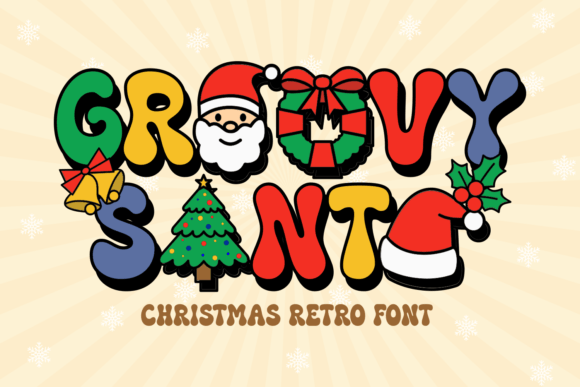
Groovy Santa is a display font that shines in large-scale digital layouts like online store banners and hero sections. Its whimsical style adds a jolly touch to holiday-themed websites, making it ideal for seasonal promotions or gift shops. When placed over an image banner, the font’s extra Christmas elements—like tiny snowflakes and sleighs—add a layered visual effect that feels both creative and cohesive.
One challenge with decorative fonts like Groovy Santa is ensuring legibility at smaller sizes. In this case, I tested the font on mobile screens and found that it worked best when used for headlines rather than body text. For the store’s main call-to-action, I paired it with a clean sans serif font to maintain readability while keeping the festive vibe intact.
Using Groovy Santa for Holiday-Themed Landing Pages
When designing a campaign landing page for a limited-time offer, I turned to Groovy Santa for the headline. The font’s personality added a sense of urgency and fun, which aligned well with the promotional tone. However, I quickly realized that using it for longer copy would be impractical. Instead, I reserved it for short phrases, such as “Limited Time Only” or “Festive Deals,” where its visual appeal could shine without overwhelming the user.
For the rest of the page, I used a simpler font to ensure the message remained clear. This approach helped maintain a balance between creativity and functionality, which is essential for any successful web design project.
Groovy Santa for Creative Portfolios and Branding Projects
A creative portfolio site required a font that could reflect the designer’s unique style while still feeling professional. Groovy Santa offered a perfect solution for the site’s logo and section headings. Its festive flair made it stand out, especially when paired with bold color schemes and dynamic imagery.
I also considered how the font would look on dark backgrounds and light backgrounds. On darker themes, Groovy Santa retained its clarity and charm, while on lighter ones, it added a warm, inviting feel. This versatility made it a strong choice for branding projects that needed a mix of playfulness and sophistication.
Integrating Groovy Santa into Digital Ads and Social Media Graphics
Digital ads and social media graphics often require quick visual impact, and Groovy Santa delivered exactly that. Its decorative elements made it ideal for holiday-themed posts, email subject lines, and ad headlines. I used it to highlight key messages, such as “Free Shipping” or “Holiday Special,” which helped draw attention without being distracting.
However, I had to be careful not to overuse it. Too many instances of Groovy Santa in a single graphic could make the design feel cluttered. Instead, I focused on using it strategically for the most important text elements, allowing the rest of the design to breathe.
Groovy Santa for Coaching Websites and Course Sales Pages
For a coaching website, the font’s playful nature was a good fit for the homepage’s headline. It added a friendly, approachable tone that resonated with the target audience. But again, I avoided using it for body text or long paragraphs, opting instead for a more readable typeface.
On a course sales page, Groovy Santa worked well for the title and subheadings. It helped create a sense of excitement around the content, which is crucial for converting visitors into students. I also used it for buttons and CTAs, where its festive look added a bit of personality without compromising usability.
Considering Readability and Layout Performance with Groovy Santa
Readability is always a top priority, especially on mobile devices. I tested Groovy Santa on small buttons and found that it became less legible when scaled down. To avoid this, I limited its use to larger text elements and ensured that there was enough spacing between letters and lines.
Another consideration was how the font would perform with image overlays. In one instance, I placed it over a background photo and noticed that the contrast was too low. By adjusting the font color and adding a subtle shadow, I improved visibility while maintaining the font’s visual character.
Groovy Santa for Blog Headers and Editorial Design
A blog redesign called for a fresh, modern look, and Groovy Santa provided the perfect touch for the header. Its festive style gave the site a seasonal update without feeling forced. I used it for the main title and a few subheadings, which helped establish a clear visual hierarchy.
For the body text, I paired Groovy Santa with a simple serif font to create a balanced and elegant reading experience. This combination allowed the decorative elements of the font to stand out while keeping the overall design easy to navigate.
Font Pairing Tips for Groovy Santa in Web Design
When working with a decorative display font like Groovy Santa, pairing it with a complementary typeface is key. A clean sans serif font works well for body text, while a serif font can add a touch of elegance to section headers. This approach ensures that the design remains functional and visually appealing across different screen sizes and platforms.
It’s also important to check the font’s availability in web formats, such as WOFF or TTF, and confirm that it includes all necessary styles and weights. Multilingual support and commercial licensing are other factors to consider, especially if the font will be used on client projects or public-facing websites.